
What Puppet configuration management does
Puppet lets you describe how systems should be configured in code. A manifest declares resources—such as packages, files, users, and services—and their desired state. Puppet compiles the applicable code into a catalog for a node; the agent applies that catalog and can correct drift on later runs.
Puppet is useful wherever teams need a repeatable way to express and maintain operating-system or application configuration. Manifests describe resources and relationships; Puppet compiles the relevant code and data into a catalog, then an agent applies it and reports differences. This guide covers general patterns first, then points to a lab implementation readers can explore.
Puppet’s main components
These pieces work together to turn versioned Puppet code and data into configuration applied to a managed system.
- Puppet Server
- Receives agent requests and compiles the appropriate Puppet code and data into a catalog for each node.
- Puppet Agent
- Runs on a managed system, requests its catalog from the server, applies the declared changes, and reports the run’s result.
- Manifest
- A file of Puppet code that declares resources—such as packages, files, users, and services—and the state they should have.
- Catalog
- The compiled set of resources and relationships for one node. The agent uses it to make the system match the declared state.
- Module
- A reusable unit of Puppet code and supporting files, commonly used to organize classes for a service or configuration area.
- Hiera
- Puppet’s key-value lookup system for keeping site, role, or node-specific values in data files instead of hard-coding them in manifests.
- Control repository and environment
- The control repository stores manifests, modules, and data in version control. Deployment tooling makes a chosen code set available as a Puppet environment that agents request.
A lab implementation you can inspect
The public Puppet control repository ↗ is one learning implementation, not a template for every organization. Its README documents this layout:
manifests/site.ppincludes the shared baseline and declares node-specific classes.modules/contains one class per reusable configuration area:linux_baseline,cis_ssh,cis_file_permissions,cis_audit_logging,cis_selinux,kernel_maintenance, andwebserver.hiera.yamldefines where data comes from;data/common.yamlholds shared package parameters anddata/nodes/is the per-node override location.
In the repository’s manifests/site.pp, the baseline and selected security classes are included outside a node block, while the webserver class is included only for a node whose certname matches its declaration.
include linux_baseline
include cis_file_permissions
include cis_ssh
include cis_audit_logging
include cis_selinux
include kernel_maintenance

node 'puppet-client1.ap-south-1.compute.internal' {
  include webserver
}
This reflects the lab’s Rocky Linux 9 example. A node name is a matching key, not a friendly label: if an agent uses a different certname, the node-specific Apache class will not match until the manifest is updated.
Common Puppet configuration use cases
Teams use Puppet to make routine configuration explicit, repeatable, and reviewable. The examples below describe common use cases; the right policy depends on the operating system, application, security requirements, and operational controls.
Maintain a consistent operating-system baseline
Declare required packages, users, groups, directories, time settings, and core services so new systems begin with a known configuration and drift can be detected or corrected.
Configure services and applications
Manage service packages, configuration files, dependencies, and service state together. A web server, monitoring agent, or application runtime can be composed as a reusable class.
Apply access and security policy
Keep SSH settings, account policy, file ownership, permissions, and selected security controls consistent. Review changes carefully because access rules can lock out administrators.
Manage logging and audit configuration
Declare required logging services, rotation rules, retention settings, and audit policy so that systems produce the operational evidence teams need.
Use data to express role and host differences
Keep reusable logic in manifests and classes, and vary appropriate values through Hiera. This helps avoid copying a slightly different manifest for every server.
Detect and correct configuration drift
On later runs, Puppet can compare a node with its catalog and bring managed resources back toward the declared state, supporting consistency across a changing fleet.
The lab repository demonstrates several of these patterns on Rocky Linux 9: a shared baseline, selected SSH and file-permission settings, audit logging, SELinux, kernel maintenance, and a node-specific Apache service. Its classes named cis_* implement selected controls only; they do not implement or certify a complete CIS benchmark.
Try the lab exercises
Use the public Puppet control repository ↗ as a guided practice environment. Its current implementation targets Rocky Linux 9; use a disposable lab machine and review its access settings before applying anything.
- Trace classification. Read
manifests/site.ppand identify which classes are shared and which are attached to the declared node. - Follow one setting. Find a package value in
data/common.yaml, then trace where the matching class consumes it. - Explore Hiera precedence. In an isolated copy, create the node data file for your lab agent and change its package list. Observe that this repository’s per-node value replaces the common array; include every package you want that node to keep. Do not edit a shared or production environment for this exercise.
- Preview the catalog. Run the agent in no-op mode and review each proposed change. Confirm the agent certname and environment match the intended node and code.
- Apply and verify in isolation. Only after reviewing the preview, apply the catalog on the disposable host and verify package or service state with the operating system’s tools.
- Make a class change. Extend a small lab class, preview it, and observe how Puppet reports the resource before and after the change.
Use Hiera to vary data without forking manifests
Hiera is Puppet’s built-in key-value data lookup system. It lets reusable Puppet code get site-specific values—such as package lists, service settings, or environment details—from data files instead of hard-coding them in manifests. A hiera.yaml file defines the lookup hierarchy: Puppet searches data sources in order, so a more specific value can override a shared default. See Puppet’s Hiera overview ↗.
In this repository, the Hiera 5 hierarchy looks for data/nodes/<trusted certname>.yaml first, then falls back to data/common.yaml. The checked-in node file currently contains only a comment, so the client inherits the common package list. The YAML below is an example of what you could put in that node file; it is not active in the repository as it stands.
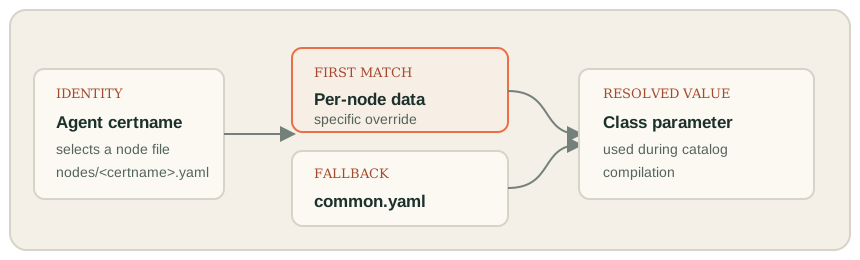
For example, a node file could set linux_baseline::packages like this:
linux_baseline::packages:
  - curl
  - git
In this repository, that per-node array replaces the common package array; it does not append to it. With this exact example, only curl and git remain in the package list managed by the baseline class. To keep the common packages and add another one, repeat the full desired list in the node file or deliberately configure Hiera array merging. Use per-node data only for an intentional exception. A larger hierarchy with group-level data is a possible scaling pattern, not something implemented in this lab.
See Puppet’s official guides to Hiera hierarchies ↗ and Hiera configuration layers ↗.
Manage larger infrastructure with code
At larger scale, the same principles need stronger classification, review, rollout, and observability. These are general design patterns, not features claimed for the small lab repository.
- Separate reusable policy from node roles. Keep shared baseline classes in modules; compose roles in classification rather than cloning one manifest per host.
- Use Hiera for intentional differences. Store a common default once, then override only values that genuinely vary by node or group.
- Promote changes in stages. Test changes on representative systems, then expand the rollout through approved environments or groups.
- Review impact before applying. Use Puppet’s no-op mode and a small rollout group for changes that affect SSH access, security settings, packages, or services.
- Keep sensitive data out of Git. This repository is public; don’t put credentials, private keys, or secret values in its YAML files.
- Measure the control plane as well as the nodes. At scale, monitor agent reachability, catalog failures, compile capacity, certificate requests, and drift rather than assuming a successful Git deploy means every host converged.
Teams may use tools such as r10k to deploy version-controlled code into Puppet environments. The mapping between source control, environment names, and agents is determined by local configuration. Review Puppet’s r10k environment deployment guide ↗ and your organization’s release process before changing a shared control plane.
Puppet troubleshooting commands
These are practical checks for Puppet installations using the Puppet Labs package paths. Service names, executable paths, and log locations can vary by platform and installation method; confirm them for your environment. The no-op command previews changes without applying them.
On the Puppet agent
sudo systemctl status puppet
sudo journalctl -u puppet --since "1 hour ago" --no-pager

sudo /opt/puppetlabs/bin/puppet config print server
sudo /opt/puppetlabs/bin/puppet config print certname
sudo /opt/puppetlabs/bin/puppet config print environment

sudo /opt/puppetlabs/bin/puppet agent --test --noop
Check that the printed certname matches the node declaration, and that the environment is the one where the code was deployed. If the no-op output shows a change you do not expect, inspect the related manifest and Hiera values before applying anything.
sudo /opt/puppetlabs/bin/puppet agent --testOn the Puppet Server
sudo systemctl status puppetserver
sudo journalctl -u puppetserver --since "1 hour ago" --no-pager
sudo tail -n 100 /var/log/puppetlabs/puppetserver/puppetserver.log
sudo ss -lntp | grep ':8140'
sudo /opt/puppetlabs/bin/puppetserver ca list --all
The lab README identifies /var/log/puppetlabs/puppetserver/puppetserver.log as its main server log, and TCP port 8140 is commonly used for agent-server traffic. Confirm paths and network policy in your own installation. Puppet’s docs describe the Puppet Server status API ↗ and metrics API ↗ for deeper health checks.
Quick things to compare
- Agent cannot retrieve a catalog: inspect agent and server logs, confirm service state and network reachability to TCP 8140, then check whether a certificate request is awaiting approval.
- Node-specific class is missing: compare the agent’s certname with the node classification and verify the requested environment contains the expected code.
- Expected parameter is missing: check the Hiera hierarchy, data key, and applicable fallback values.
- Changes recur on every run: inspect the resource’s desired value and the command guards; investigate why the node differs instead of suppressing the report.
Safety and limits of this example
nikunj account receives passwordless full sudo. Review and adapt the manifests for your own users, operating system, access model, and change controls first.- The manifests and package/service names are written for Rocky Linux 9; validate any port to another distribution.
- The SSH allowlist permits
rocky, while the baseline creates a separatenikunjuser. Confirm your access path and keep console recovery before applying SSH changes. - Selected controls are not the full CIS benchmark and do not constitute certification.
- This article does not claim that the lab has been deployed or successfully applied. Review the repository and your own no-op output before using the code.
What to explore next
After completing the exercises, explore role-level Hiera data, add a narrowly scoped module, test staged promotion, or connect configuration changes to an automated review workflow. Treat each as a learning extension and validate it in an isolated environment.
Browse the Puppet control repository on GitHub ↗ for the lab source.
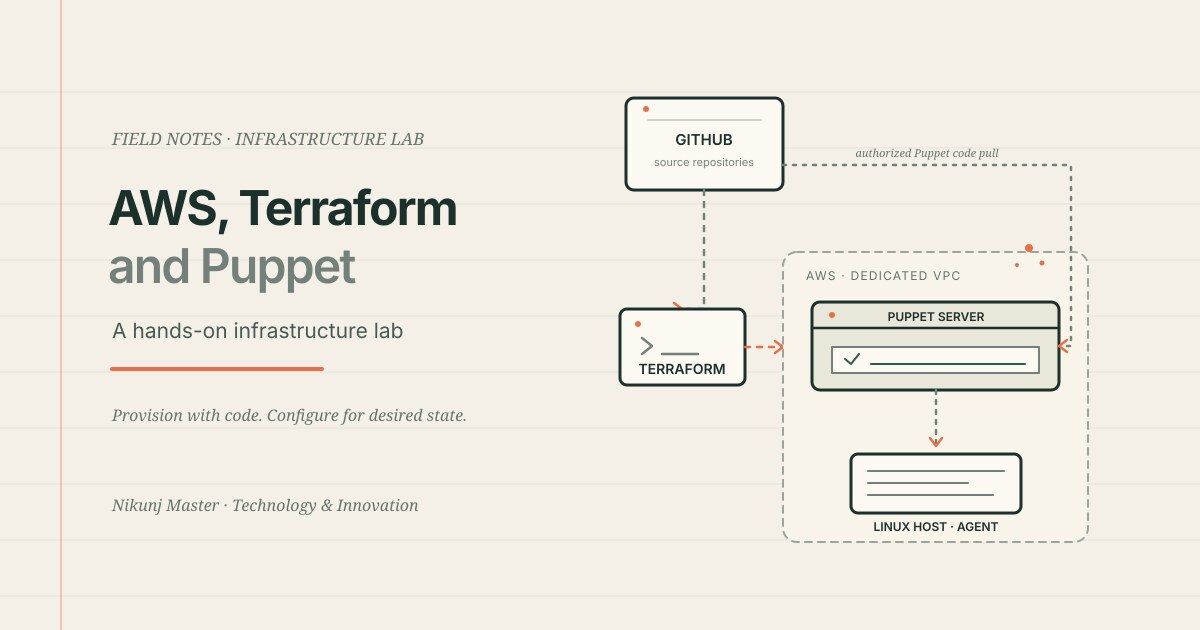
Provision AWS with Terraform. Configure Linux with Puppet.
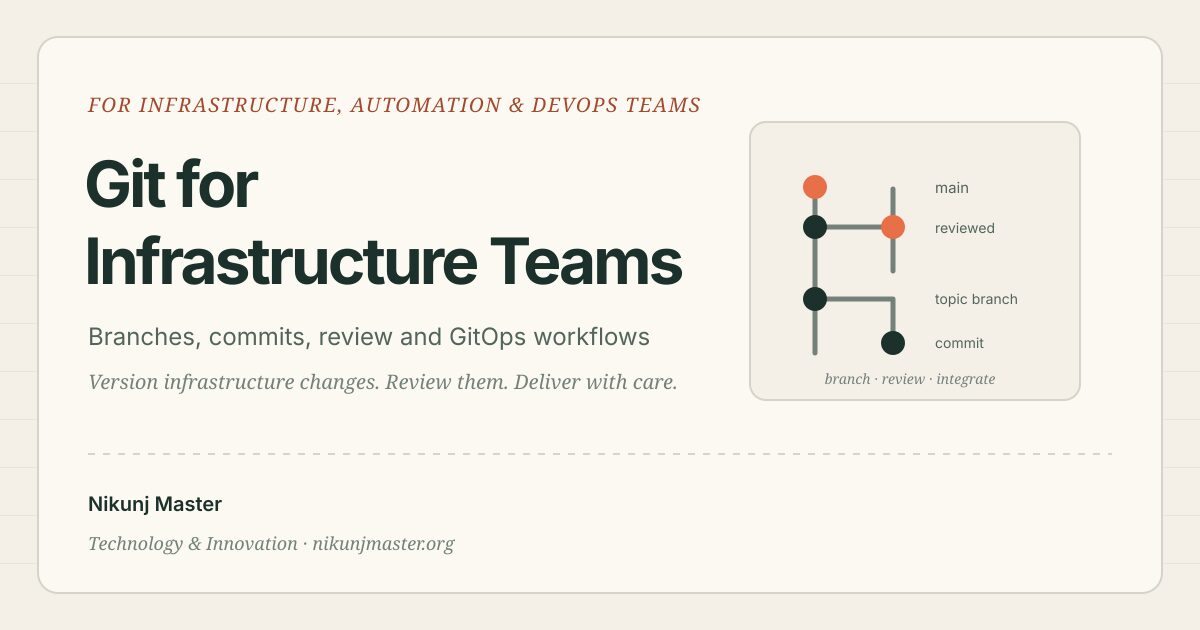
Manage infrastructure work with Git
Configuration as code makes a system’s intended state easier to review, repeat, and improve. The important part is to understand exactly what the code will change before you apply it.